Grid Layout
You can define sections within the grid and set spans for headers, footers, left panels, and right panels.
Example Usage:
 GridLayout gridLayout = GridLayout.create()
     .setGap("10px")
     .setHeaderSpan(SectionSpan.of(1, 3))
     .setLeftSpan(SectionSpan.of(2, 1, 1), true, true)
     .withContent(contentElement ->  {
         // Add content to the main content area
     });
 RootPanel.get().appendChild(gridLayout);
See also :
Anatomy
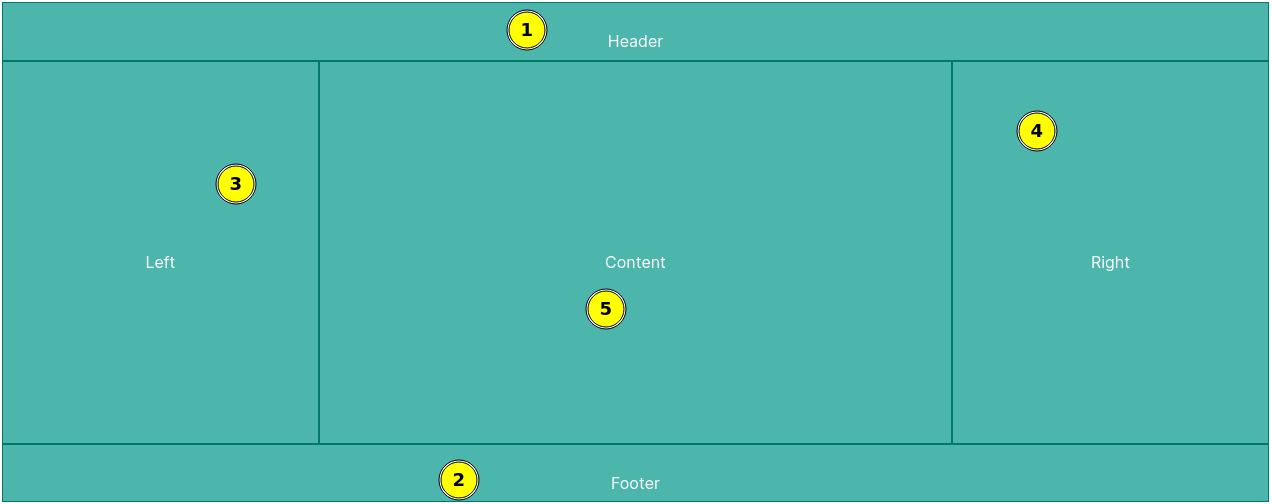
- Header section, Optional, can span down up to 6 rows.
- Footer section, Optional, can span up to 6 rows.
- Left section, Optional, can span right up to 6 columns and can span up or down to take over the space from the header and footer.
- Right section, Optional, can span left up to 6 column and can span up or down to take over the space from the header and footer.
- Content panel, Mandatory, this is the main layout content panel.
Examples
API Docs:
Constructors
public void GridLayout()
The grid layout is initialized with an empty content area and no sections. You can further configure the layout by adding sections and setting spans.
Static methods
public static GridLayout create()
The grid layout is initialized with an empty content area and no sections. You can further configure the layout by adding sections and setting spans.
Returns:
A new instance of the GridLayout.
Public methods
public GridLayout setGap(String gap)
gap
The gap between grid items, e.g., "10px".
Returns:
This GridLayout instance for method chaining.
public GridLayout setHeaderSpan(SectionSpan sectionSpan)
sectionSpan
The span for the header section.
Returns:
This GridLayout instance for method chaining.
public GridLayout hideHeader()
Returns:
This GridLayout instance for method chaining.
public GridLayout setRightSpan(SectionSpan sectionSpan, boolean spanUp, boolean spanDown)
sectionSpan
The span for the right section.
spanUp
Whether to span up.
spanDown
Whether to span down.
Returns:
This GridLayout instance for method chaining.
public GridLayout hideRight()
Returns:
This GridLayout instance for method chaining.
public GridLayout setLeftSpan(SectionSpan sectionSpan, boolean spanUp, boolean spanDown)
sectionSpan
The span for the left section.
spanUp
Whether to span up.
spanDown
Whether to span down.
Returns:
This GridLayout instance for method chaining.
public GridLayout hideLeft()
Returns:
This GridLayout instance for method chaining.
public GridLayout setFooterSpan(SectionSpan sectionSpan)
sectionSpan
The span for the footer section.
Returns:
This GridLayout instance for method chaining.
public GridLayout hideFooter()
Returns:
This GridLayout instance for method chaining.
public DivElement getContentElement()
Returns:
The content element.
public GridLayout withContent(ChildHandler<GridLayout, DivElement> handler)
handler
The child handler for the content element.
Returns:
This GridLayout instance for method chaining.
public DivElement getHeaderElement()
Returns:
The header element.
public GridLayout withHeader(ChildHandler<GridLayout, DivElement> handler)
handler
The child handler for the header element.
Returns:
This GridLayout instance for method chaining.
public DivElement getFooterElement()
Returns:
The footer element.
public GridLayout withFooter(ChildHandler<GridLayout, DivElement> handler)
handler
The child handler for the footer element.
Returns:
This GridLayout instance for method chaining.
public DivElement getLeftElement()
Returns:
The left panel element.
public GridLayout withLeftPanel(ChildHandler<GridLayout, DivElement> handler)
handler
The child handler for the left panel element.
Returns:
This GridLayout instance for method chaining.
public DivElement getRightElement()
Returns:
The right panel element.
public GridLayout withRightPanel(ChildHandler<GridLayout, DivElement> handler)
handler
The child handler for the right panel element.
Returns:
This GridLayout instance for method chaining.