Breadcrumbs
This component displays locations with the ability to navigate between them and highlighting the current one, each location can have text and icon with a click listener.
See also :
Clicking a BreadcrumbItem would trigger change listeners defined on the Breadcrumb, the library user can use them to navigate the user to different views or pages.
See also :
Anatomy
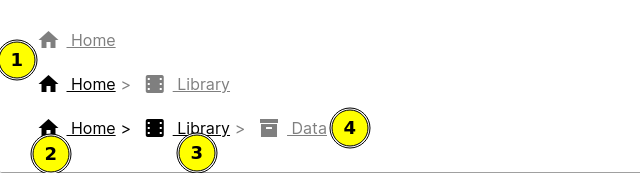
- Breadcrumb consist of several links represents the navigation path.
- Each link in the breadcrumb represent a point in the navigation path and can have an icon in addition to the path text.
- Breadcrumb links can be programmed to navigate back to that point in the path
- Last breadcrumb path is the current active page, so it is not clickable by default.
Examples
Basic breadcrumbs Breadcrumbs with text and icons.
Breadcrumbs with backgrounds Breadcrumbs can have a background to match the application design.
Breadcrumbs alignment Breadcrumbs can have different alignment.
API Docs: Breadcrumb
Constructors
public void Breadcrumb()
Static methods
public static Breadcrumb create()
Returns:
new breadcrumb instance
Public methods
public Breadcrumb appendChild(String text, EventListener onClick)
text and onClick listener
text
the label of the location
onClick
EventListener that will be called when the location is clicked
Returns:
same breadcrumb instance
public Breadcrumb appendChild(Icon<?> icon, String text, EventListener onClick)
icon
the Icon of the location
text
the label of the location
onClick
EventListener that will be called when the location is clicked
Returns:
same breadcrumb instance
public Breadcrumb appendChild(BreadcrumbItem[] items)
items
the BreadcrumbItem s to be added
Returns:
same breadcrumb instance
public Breadcrumb appendChild(boolean silent, BreadcrumbItem[] items)
silent
boolean, if true to ignore the change listeners, otherwise change listeners will be triggered.
items
the BreadcrumbItem s to be added
Returns:
same breadcrumb instance
public Breadcrumb appendChild(BreadcrumbItem item)
item
the BreadcrumbItem to be added
Returns:
same breadcrumb instance
public Breadcrumb removeChildFrom(int itemFromIndex, boolean silent)
itemFromIndex
the starting index from of the breadcrumb items to be removed
silent
boolean, if true dont trigger change listeners
Returns:
same breadcrumb instance
public Breadcrumb setActiveItem(BreadcrumbItem item)
item
The item be set as active one
Returns:
same breadcrumb instance
public Breadcrumb setActiveItem(BreadcrumbItem item, boolean silent)
item
The item be set as active one
silent
boolean, if true dont trigger change handlers
Returns:
same breadcrumb instance
public Breadcrumb setRemoveActiveTailItem(boolean removeTail)
Default to false
Example:
- Given
removeTailis true and having 4 locations as follows:A -> B -> C -> D
when selecting location B , then the new locations will be as follows:
A -> B
- Given
removeTailis false and having 4 locations as follows:A -> B -> C -> D
when selecting location B , then the new locations will be as follows:
A -> B -> C -> D
removeTail
true to enable remove tail on item activation, false to disable it.
Returns:
same breadcrumb instance
public Breadcrumb removeAll()
Returns:
same breadcrumb instance
public BreadcrumbItem getActiveItem()
public List<BreadcrumbItem> getItems()
Returns:
a List of all breadcrumb items currently available in the breadcrumb instance.
API Docs: BreadcrumbItem
Constructors
public void BreadcrumbItem(String text)
text
The label text for the BreadcrumbItem
public void BreadcrumbItem(String text, Icon<?> icon)
text
The label text for the BreadcrumbItem
icon
An Icon that prefix the BreadcrumbItem labels
public void BreadcrumbItem(Icon<?> icon, String text)
icon
An Icon that prefix the BreadcrumbItem labels
text
The label text for the BreadcrumbItem
Static methods
public static BreadcrumbItem create(String text)
text
The label text for the BreadcrumbItem
Returns:
new BreadcrumbItem instance
public static BreadcrumbItem create(Icon<?> icon, String text)
icon
An Icon that prefix the BreadcrumbItem labels
text
The label text for the BreadcrumbItem
Returns:
new BreadcrumbItem instance
Public methods
public HTMLAnchorElement getClickableElement()
Returns:
the element instance within this component that would receive the clicks when we register a click event listener directly to the BreadcrumbItem
public Text getTextElement()
public Icon<?> getIcon()
public boolean isActive()
Returns:
true if the item is active, false otherwise.
public BreadcrumbItem withAnchor(ChildHandler<BreadcrumbItem, AnchorElement> handler)
handler
A ChildHandler that will apply the desired customization, holds a reference to both the BreadcrumbItem and the AnchorElement
Returns:
same BreadcrumbItem instance