Application Layout
See also :
Anatomy
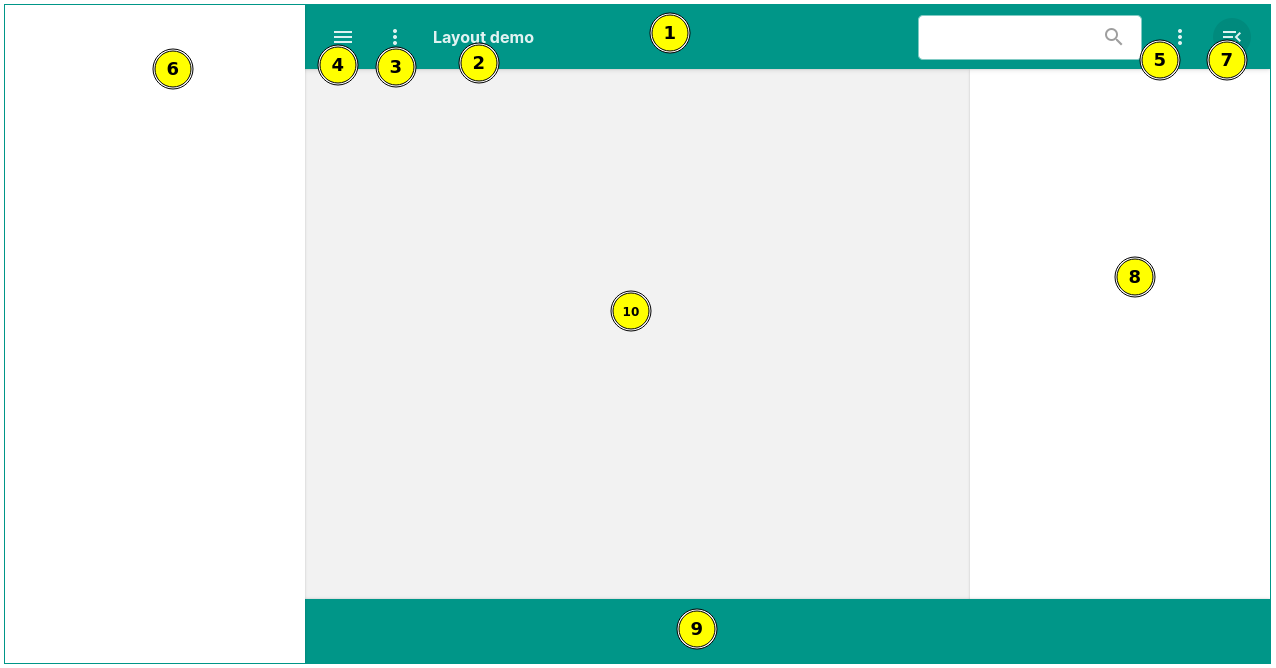
- Navigation bar.
- Application title, a description can also be added to show under the title.
- Navigation bar prefix elements, will always be appended to the left of the title.
- Left drawer toggle button.
- Navigation bar postfix elements, will always be appended to the right most of the navigation bar.
- Left drawer, can span up to cover the navigation bar, or span down to cover the footer, or can be placed under the navigation bar or above the footer.
- Right drawer toggle button.
- Right drawer, cant span up or down to cover the navigation bar or the footer.
- Footer, can be fixed at the bottom of the screen or set to scroll with the body.
- Main content panel.
Examples
API Docs:
Constructors
public void AppLayout()
public void AppLayout(String title)
title
The title to be displayed in the navigation bar.
Returns:
A new AppLayout instance.
Static methods
public static AppLayout create()
Returns:
A new AppLayout instance.
public static AppLayout create(String title)
title
The title to be displayed in the navigation bar.
Returns:
A new AppLayout instance.
Public methods
public DivElement getLayout()
Returns:
The layout element as a DivElement .
public SectionElement getBody()
Returns:
The body section element as a SectionElement .
public SectionElement getContent()
Returns:
The content section element as a SectionElement .
public NavBar getNavBar()
Returns:
The navigation bar as a NavBar instance.
public HeaderElement getHeader()
Returns:
The header element as a HeaderElement .
public SectionElement getFooter()
Returns:
The footer section element as a SectionElement .
public SectionElement getLeftDrawer()
Returns:
The left drawer section element as a SectionElement .
public AsideElement getLeftDrawerContent()
Returns:
The left drawer content as an AsideElement .
public SectionElement getRightDrawer()
Returns:
The right drawer section element as a SectionElement .
public SectionElement getRightDrawerContent()
Returns:
The right drawer content as a SectionElement .
public AppLayout withLayout(ChildHandler<AppLayout, DivElement> handler)
handler
The handler for configuring the layout.
Returns:
This AppLayout instance for method chaining.
public AppLayout withBody(ChildHandler<AppLayout, SectionElement> handler)
handler
The handler for configuring the body section.
Returns:
This AppLayout instance for method chaining.
public AppLayout withContent(ChildHandler<AppLayout, SectionElement> handler)
handler
The handler for configuring the content section.
Returns:
This AppLayout instance for method chaining.
public AppLayout withNavBar(ChildHandler<AppLayout, NavBar> handler)
handler
The handler for configuring the navigation bar.
Returns:
This AppLayout instance for method chaining.
public AppLayout withHeader(ChildHandler<AppLayout, HeaderElement> handler)
handler
The handler for configuring the header element.
Returns:
This AppLayout instance for method chaining.
public AppLayout withFooter(ChildHandler<AppLayout, SectionElement> handler)
handler
The handler for configuring the footer section.
Returns:
This AppLayout instance for method chaining.
public AppLayout withLeftDrawer(ChildHandler<AppLayout, SectionElement> handler)
handler
The handler for configuring the left drawer section.
Returns:
This AppLayout instance for method chaining.
public AppLayout withRightDrawer(ChildHandler<AppLayout, SectionElement> handler)
handler
The handler for configuring the right drawer section.
Returns:
This AppLayout instance for method chaining.
public AppLayout withLeftDrawerContent(ChildHandler<AppLayout, AsideElement> handler)
handler
The handler for configuring the left drawer content.
Returns:
This AppLayout instance for method chaining.
public AppLayout withRightDrawerContent(ChildHandler<AppLayout, SectionElement> handler)
handler
The handler for configuring the right drawer content.
Returns:
This AppLayout instance for method chaining.
public AppLayout withNavBar()
Returns:
This AppLayout instance for method chaining.
public AppLayout withHeader()
Returns:
This AppLayout instance for method chaining.
public AppLayout withFooter()
Returns:
This AppLayout instance for method chaining.
public AppLayout withLeftDrawer()
Returns:
This AppLayout instance for method chaining.
public AppLayout withRightDrawer()
Returns:
This AppLayout instance for method chaining.
public AppLayout withLeftDrawerContent()
Returns:
This AppLayout instance for method chaining.
public AppLayout withRightDrawerContent()
Returns:
This AppLayout instance for method chaining.
public AppLayout setLeftDrawerSize(LeftDrawerSize size)
size
The size of the left drawer.
Returns:
This AppLayout instance for method chaining.
public AppLayout setRightDrawerSize(RightDrawerSize size)
size
The size of the right drawer.
Returns:
This AppLayout instance for method chaining.
public AppLayout toggleLeftDrawerSpanUp()
Returns:
This AppLayout instance for method chaining.
public AppLayout setLeftDrawerSpanUp(boolean spanUp)
spanUp
true to enable the span-up effect, false to disable it.
Returns:
This AppLayout instance for method chaining.
public AppLayout toggleLeftDrawerSpanDown()
Returns:
This AppLayout instance for method chaining.
public AppLayout setLeftDrawerSpanDown(boolean spanDown)
spanDown
true to enable the span-down effect, false to disable it.
Returns:
This AppLayout instance for method chaining.
public AppLayout toggleShrinkContent()
Returns:
This AppLayout instance for method chaining.
public AppLayout setShrinkContent(boolean shrink)
shrink
true to enable content shrinking, false to disable it.
Returns:
This AppLayout instance for method chaining.
public AppLayout toggleLeftOverlay()
Returns:
This AppLayout instance for method chaining.
public AppLayout toggleRightOverlay()
Returns:
This AppLayout instance for method chaining.
public AppLayout toggleLeftDrawer()
Returns:
This AppLayout instance for method chaining.
public AppLayout toggleRightDrawer()
Returns:
This AppLayout instance for method chaining.
public AppLayout toggleFixedFooter()
Returns:
This AppLayout instance for method chaining.
public AppLayout setFixedFooter(boolean fixed)
fixed
true to fix the footer, false to unfix it.
Returns:
This AppLayout instance for method chaining.
public AppLayout showLeftDrawer()
Returns:
This AppLayout instance for method chaining.
public AppLayout hideLeftDrawer()
Returns:
This AppLayout instance for method chaining.
public AppLayout showRightDrawer()
Returns:
This AppLayout instance for method chaining.
public AppLayout hideRightDrawer()
Returns:
This AppLayout instance for method chaining.
public AppLayout setLeftDrawerToggleIcon(Icon<?> icon)
icon
The icon to set.
Returns:
This AppLayout instance for method chaining.
public AppLayout setRightDrawerToggleIcon(Icon<?> icon)
icon
The icon to set.
Returns:
This AppLayout instance for method chaining.
public AppLayout setAutoCloseLeftDrawer(boolean autoCloseLeftDrawer)
autoCloseLeftDrawer
true to enable auto-closing, false to disable it.
Returns:
This AppLayout instance for method chaining.
public AppLayout setFixLeftDrawer(boolean fixed)
fixed
true to fix the left drawer, false to unfix it.
Returns:
This AppLayout instance for method chaining.
public AppLayout setAutoCloseRightDrawer(boolean autoCloseRightDrawer)
autoCloseRightDrawer
true to enable auto-closing, false to disable it.
Returns:
This AppLayout instance for method chaining.
public AppLayout withLeftDrawerToggle(ChildHandler<AppLayout, PrefixAddOn<HTMLElement>> handler)
handler
The handler for configuring the left drawer toggle button.
Returns:
This AppLayout instance for method chaining.
public AppLayout setLeftDrawerToggleVisible(boolean visible)
visible
true to make the toggle button visible, false to hide it.
Returns:
This AppLayout instance for method chaining.
public boolean isLeftDrawerOpen()
Returns:
true if the left drawer is open, false otherwise.
public boolean isRightDrawerOpen()
Returns:
true if the right drawer is open, false otherwise.
public AppLayout onLeftDrawerOpen(ChildHandler<AppLayout, SectionElement> handler)
handler
The handler to be called when the left drawer is opened.
Returns:
This AppLayout instance for method chaining.
public AppLayout removeLeftDrawerOpenListener(ChildHandler<AppLayout, SectionElement> handler)
handler
The handler to be removed from the list of listeners.
Returns:
This AppLayout instance for method chaining.
public AppLayout onLeftDrawerClosed(ChildHandler<AppLayout, SectionElement> handler)
handler
The handler to be called when the left drawer is closed.
Returns:
This AppLayout instance for method chaining.
public AppLayout removeLeftDrawerCloseListener(ChildHandler<AppLayout, SectionElement> handler)
handler
The handler to be removed from the list of listeners.
Returns:
This AppLayout instance for method chaining.
public AppLayout onRightDrawerOpen(ChildHandler<AppLayout, SectionElement> handler)
handler
The handler to be called when the right drawer is opened.
Returns:
This AppLayout instance for method chaining.
public AppLayout removeRightDrawerOpenListener(ChildHandler<AppLayout, SectionElement> handler)
handler
The handler to be removed from the list of listeners.
Returns:
This AppLayout instance for method chaining.
public AppLayout onRightDrawerClosed(ChildHandler<AppLayout, SectionElement> handler)
handler
The handler to be called when the right drawer is closed.
Returns:
This AppLayout instance for method chaining.
public AppLayout removeRightDrawerCloseListener(ChildHandler<AppLayout, SectionElement> handler)
handler
The handler to be removed from the list of listeners.
Returns:
This AppLayout instance for method chaining.